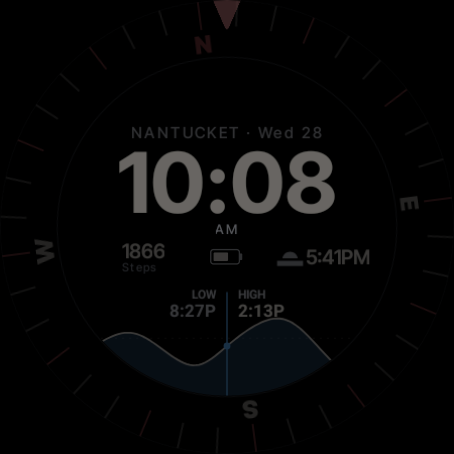
A free watch face for Wear OS that puts the tide, a compass and the wind forecast on your wrist.
Wear OS · Free · Coming soon to Google Play
Overview
We made Sagamore Tides for days on the water, and for anyone who likes to know what the sea is doing. It turns your watch into a small marine instrument, with the information you'd normally check on your phone laid out on one dial.
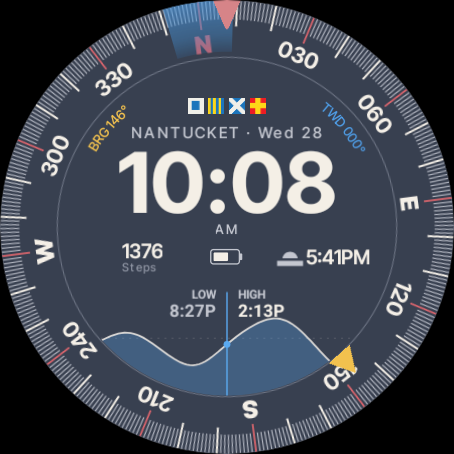
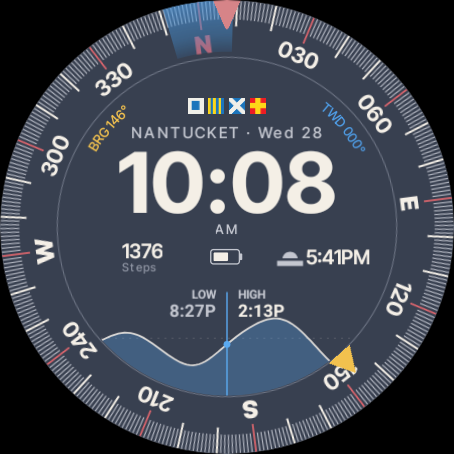
The dial is a full 360-degree compass card with a tick for every degree. The time sits in the middle, the tide chart rises and falls below it, and marks on the rim show the wind and the bearing you mean to steer.
The face works together with a companion app on your watch. The app gathers tide predictions, the wind forecast and your heading, and the face shows them at a glance.
What's on the dial
Tide chart. The tide around the current time, with the last and next high or low, for any of about 3,500 NOAA stations, nearest first.
Compass. A full 360-degree card that turns with you while the screen is on, and fades when the reading gets out of date, so it never looks live when it is not.
Wind. The National Weather Service forecast for where you are, shown as a band around the rim and in the caption.
Bearing. Set a bearing in the app and a mark appears on the rim, so you can steer to it without opening anything.
Two slots of your choice. Steps and sunrise or sunset to start with, or swap in heart rate, weather or an app shortcut, drawn to match the dial.
Always on. When your watch dims, a simple dark dial keeps the essentials visible.
Colour schemes
Pick the look that suits the conditions. Every scheme works with a 12 or 24-hour clock.
NightThe default, easy to read in any light.
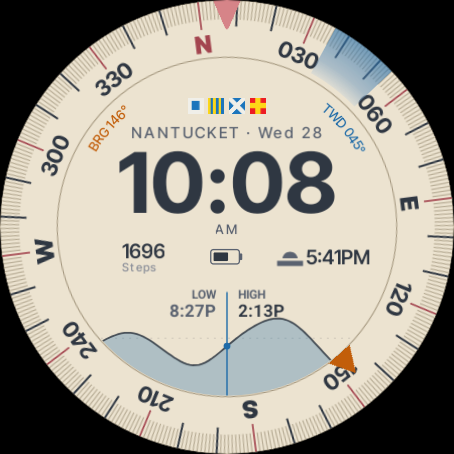
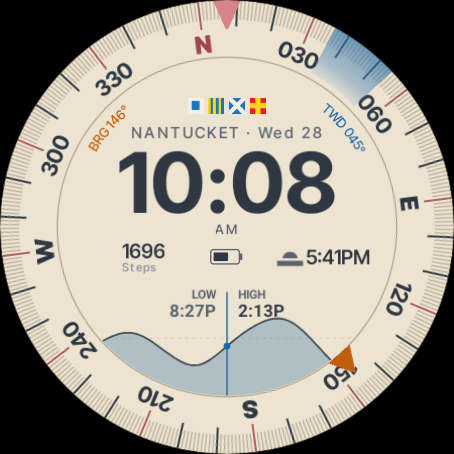
ParchmentWarm and paper-coloured, like an old chart.
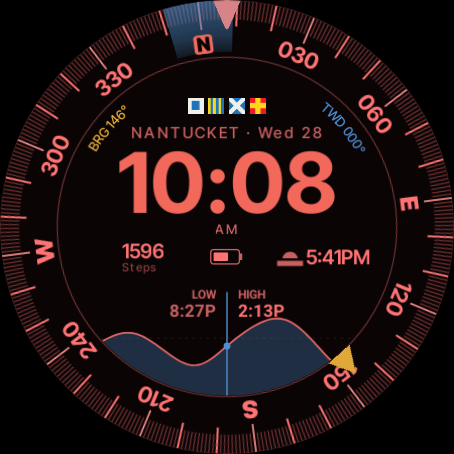
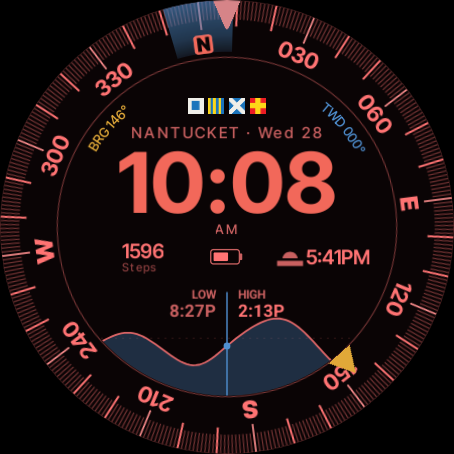
Battle StationsAll red, to protect your night vision.
The face and the app
The watch face · Free
Sagamore Tides Watch Face
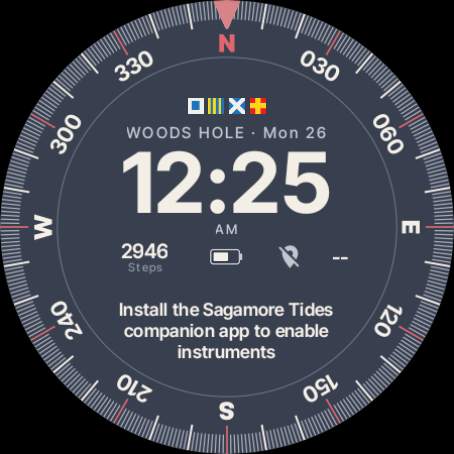
On its own the face keeps the time, the date and your two slots, and asks you to install the app. It has no permissions and no network access.
The app
Sagamore Tides
Runs on the watch and brings the dial's instruments to life:
Any NOAA tide station, sorted nearest first
The live compass and bearing mark
The wind forecast and your course over ground
Colour schemes, clock format and dial options
Getting started
Install the app
Get the Sagamore Tides app on your watch first. It looks after the tide, wind and compass data.
Add the face
Choose Sagamore Tides from your watch faces. On its own it still shows the time, the date and your two slots.
Pick your port
Open the app and choose your tide station. The closest ones are listed first.
The watch face needs Wear OS 6 or later. The app needs Wear OS 4 or later. The full steps are in the manual below.
Manual
01
Install
Install the app first. Open the Sagamore Tides listing on Google Play and choose your watch as the device to install on.
Install the watch face. Do the same with Sagamore Tides Watch Face.
Set the face. Long-press the current watch face, swipe to Sagamore Tides and tap it.
Open the app once. Tap the middle of the dial. Allow location when it asks. The app uses it to sort ports by distance and to fetch the wind for where you are.
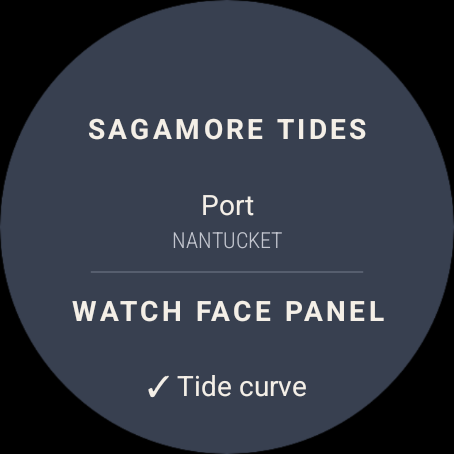
Pick your port. Swipe to the settings page, tap Port, and choose the nearest station.
Installed the app after the face? The face links up with the app only when you choose the face. Switch to another watch face and back again, and the instruments appear. Until then the app's settings page shows Watch face not connected.
You can refuse location. The app still works, but the port list starts from the last port you chose, and wind, speed and course show a dash.
02
Reading the dial
The Night scheme
1
Bow index. The red triangle at 12 o'clock marks the way the top of the watch is pointing. Read your heading off the card under it.
2
Compass card. Turns so north stays north. Numerals every 30°, cardinal letters at N, E, S and W.
3
Bearing mark. A yellow triangle (orange on Parchment) at the bearing you set. The curved BRG caption on the left gives the number.
4
Wind block. A faded blue band at the direction the wind is coming from. The curved TWD caption on the right gives the number.
5
Course mark. A blue "C" blade at your course over ground. It appears only when GPS has a fix and you are moving at 1 knot or more.
Tide panel. The chart around now, with the last and next turn. The blue line is now. You can show the next turns or your speed and course here instead.
Tap the middle of the dial at any time to open the app.
Without the app, the face asks you to install it
Without the app, a message in place of the tide chart asks you to install it. Tapping the message opens Google Play on the watch, where you can search for Sagamore Tides.
While a Galaxy Watch is locked, it hides complication data and shows a dash instead. The face keeps the tide chart and the date on screen until you unlock it.
03
Compass and bearing
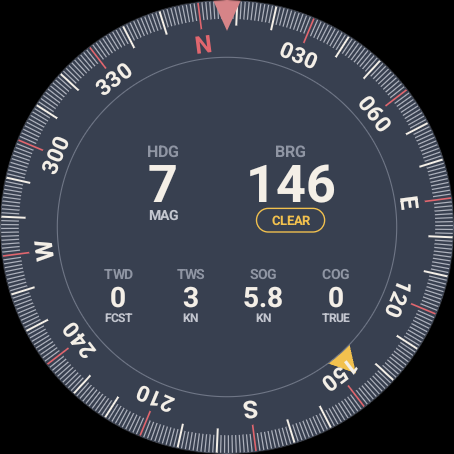
The compass page, with a bearing set
The compass page is the first page of the app. The face's compass card turns while the screen is on, and the app switches the sensor off when the screen goes dark to save battery. When you raise your wrist, the card picks up where it left off.
Set a bearing
Open the app on the compass page.
Drag your finger around the ring, or turn the bezel, until the yellow mark sits on the bearing you want.
The face shows the bearing mark and the BRG caption from then on.
Clear a bearing
Tap Clear under the bearing.
Readings on the compass page
Heading (HDG, magnetic) and bearing (BRG) are large in the middle. Below them are the forecast wind direction (TWD) and speed (TWS) in knots, and your speed (SOG, knots) and course (COG, true) over ground. A reading with no source shows a dash instead of an old number.
If the card looks dim, the watch has not had a fresh compass reading for about 30 seconds. Open the app or move your wrist to wake it.
04
Tide and ports
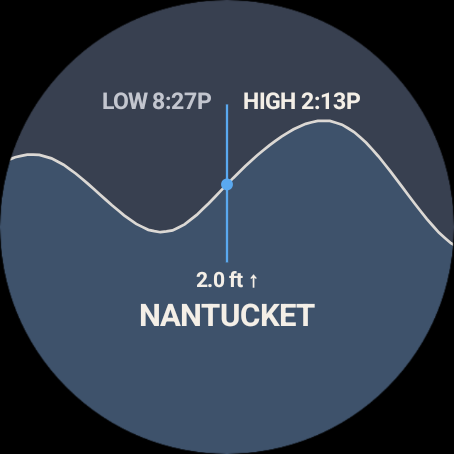
The tide page
Choosing a port, nearest first
Swipe up from the compass page to reach the tide page. It shows the chart for your port, the last and next turn, and the height now with an arrow for rising or falling.
Change port
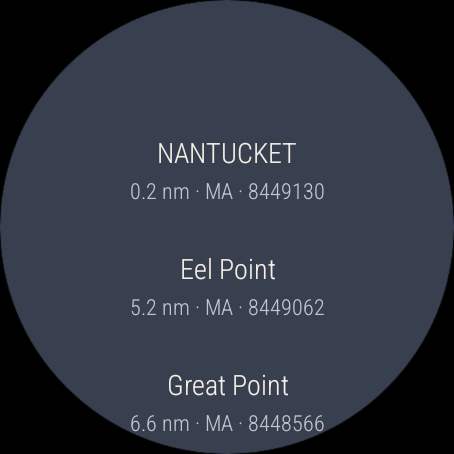
On the settings page, tap Port. The list holds every NOAA tide station, nearest first, with its distance in nautical miles, its state and its NOAA station number. Tap one and the face follows within a few seconds.
Two kinds of station
Harmonic stations come with a full published curve. Most stations are subordinate: NOAA publishes only their highs and lows, so the app draws a smooth curve through them. Either way, the times of high and low water are NOAA's own figures.
05
Settings
Settings, the last page in the app
Swipe to the last page of the app. Changes reach the face straight away.
Chooses what the panel under the time shows: the tide curve, the next turns, or speed and course.
Wind block
Shows or hides the wind mark on the rim.
Bearing mark
Shows or hides the bearing mark on the rim.
Course blade
Shows or hides the "C" course mark. With it off, the watch uses GPS only while the app is open, which saves battery.
Colour scheme
Night, Parchment or Battle Stations. See colour schemes.
24-hour time
Switches the clock to 24 hours and hides AM/PM.
If the watch face is not installed, the top of the page offers Get the watch face, which opens its Google Play listing. Tapping sagamore.studio at the bottom opens this site on your phone.
06
Colour schemes
Choose a scheme in the app's settings. The face and the app always match.
NightSlate blue ground and light ink. The default.
ParchmentA chart-paper ground for bright daylight.
Battle StationsRed on black, to preserve your night vision.
07
Always-on display
The dial when the watch is resting
When the watch dims, the ground turns black and the dial keeps the time, your slots, the tide, the cardinal points and the main numerals. It uses the night ink whatever scheme you chose, so it stays easy on the battery.
08
Your own slots
The two slots either side of the battery are yours. Out of the box the left slot shows your steps and the right slot shows the next sunrise or sunset. To change them, long-press the face, tap Customize, and choose what each one shows, for example heart rate, the weather or an app shortcut.
The face draws whatever you choose in its own fonts and colours, with the icon to the left of the value and a small label underneath. App shortcuts show the app's own icon, tinted to the scheme, inside a thin ring.
The rest of the dial is fed by the app and does not appear in the editor.
09
Data and accuracy
Reading
Source
How often
Tide
NOAA CO-OPS predictions
Up to twice a day, saved on the watch
Wind
National Weather Service hourly forecast
Every 3 hours, saved on the watch
Heading
The watch's own compass sensor
Continuous while the screen is on
Speed and course
The watch's GPS
While the app is open, or the course blade is on
Predictions and the last forecast stay saved on the watch, so the dial keeps working without a connection.
Privacy
There are no accounts, ads or analytics, and nothing about you reaches us. To fetch the wind, the app sends your position, rounded to two decimal places, to the National Weather Service. Read the full Sagamore Tides privacy policy.
10
Troubleshooting
The face asks me to install the app, but it is installed
The face links up with the app only when you choose the face. Switch to another watch face and back again. The app's settings page shows Watch face not connected until you do.
The compass card does not turn
Check that the app is installed and that you have opened it once. The card turns only while the screen is on.
The card looks faded
The watch has not had a fresh compass reading for about 30 seconds. Raise your wrist or open the app. If it stays faded, wave the watch in a figure of eight to recalibrate the compass.
Wind, speed or course show a dash
Wind needs location permission and a connection at least once every few hours. Speed and course need a GPS fix and the course blade turned on in settings. Under 1 knot, course is hidden on purpose because it is not reliable.
A side slot shows a dash
Steps and sunrise need the watch's own permissions for health data and location. Open the slot's app once, or allow the permission when the watch asks. While a Galaxy Watch is locked, every slot shows a dash until you unlock it.
I see a Sagamore Tides notification
Wear OS asks apps that read the compass in the background to show one. It is set to the lowest priority and should stay out of your way.